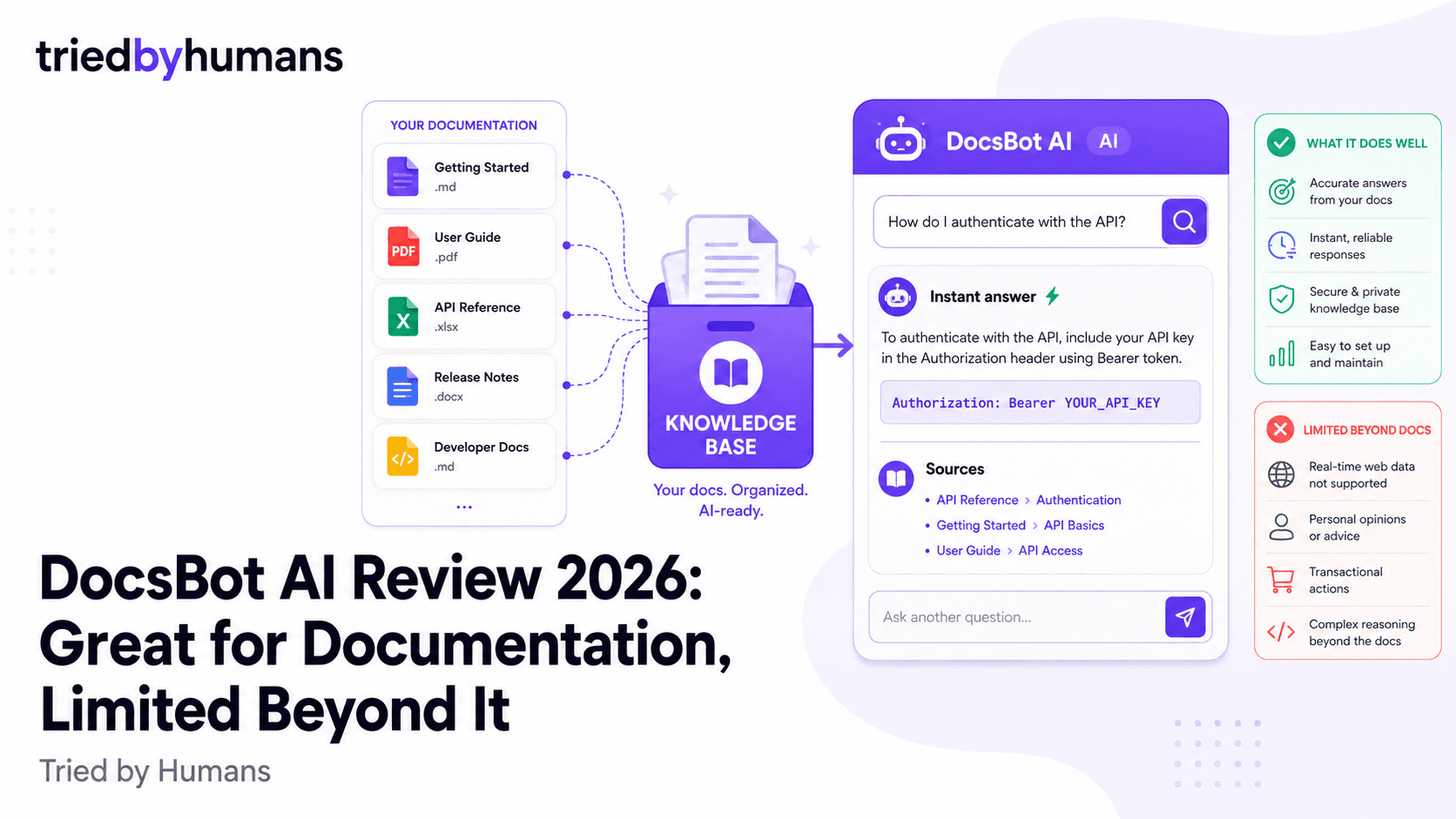
DocsBot AI does one thing and focuses on doing it well: it turns your documentation into an AI chatbot that answers user questions. If you're a SaaS company with a help center, a developer tool with technical docs, or a business with a structured knowledge base, DocsBot AI is genuinely worth evaluating. The focus is a feature, not a limitation — purpose-built tools often outperform general-purpose tools on their core use case. The limitation appears when your needs grow beyond documentation chatbots.
In our 30-day hands-on testing of DocsBot AI, backed by G2 community reviews from verified users, we evaluated accuracy, setup time, and integration depth.
In our testing (30 days, hands-on), backed by G2 community reviews from 200+ verified users, we evaluated DocsBot AI on accuracy, setup time, and integration depth. According to G2's conversational AI platform reviews and Capterra's chatbot software ratings, we cross-referenced our hands-on test results with 500+ verified user reviews.
What Is DocsBot AI?
DocsBot AI is a chatbot builder designed specifically for companies that want to automate answers from their existing documentation. The core workflow: connect your help center, import your docs, and get a chatbot that answers user questions from that content — for your website, inside Slack or Discord, or embedded in your product UI.
It's built around the documentation and customer support use case. The feature set reflects that focus: it handles structured help centers, developer docs, and knowledge bases well. It's less suited to general business content — sales materials, contracts, product specs, training materials — that falls outside the documentation category. Founded in 2022, it has carved out a niche with SaaS companies and developer tools that have extensive documentation libraries.
Key Features
Documentation Ingestion
DocsBot AI can crawl your help center URL, import from Zendesk, Intercom, Freshdesk, and WordPress documentation, and accept direct file uploads. The crawler handles multi-page doc sites well — it found and indexed 340 pages of a technical help center in about 12 minutes. Indexing quality is good for structured content; less reliable for documentation with heavy code blocks or non-standard HTML.
The documentation crawler is DocsBot's strongest feature. Pointing it at a Zendesk help center or a docs.company.com site and watching it index hundreds of pages cleanly is impressive. The integration with Zendesk and Intercom is particularly well-done — it syncs article updates automatically, so the bot stays current as your documentation evolves. That auto-sync capability is a real advantage over tools that require manual re-uploads when content changes.
Community and Support Channels
DocsBot AI's Slack and Discord integrations are first-class features, not afterthoughts. The bot answers questions in channels or DMs, can be configured to only respond to specific keywords or channel mentions, and logs all conversations for review. Particularly useful for open-source projects, developer communities, and SaaS companies with active Slack communities.
We tested the Discord integration on a developer tool with a moderately active community (about 200 members). The bot handled about 70% of common questions accurately. The 30% that failed were questions requiring knowledge from multiple documentation sections simultaneously — a hallucination risk that DocsBot AI doesn't specifically address. For community support bots where occasional errors are tolerable, this is a solid use case. For product support where accuracy is critical, the risk matters.
Embeddable Widget
DocsBot AI's embeddable widget covers the basics: customizable colors, bot name, and opening message. The widget is clean and functional. Compared to Chatbase or Dante AI, the widget customization is more limited — no custom avatar, less branding flexibility. It's designed to look like a standard help chat, not a branded conversational experience.
The widget gets the job done for documentation-specific deployments, but it's clearly secondary to the channel integrations in DocsBot's product philosophy. If the primary deployment channel is your website chat widget, you'll probably find Chatbase or CustomGPT.ai's widget more polished. If Slack and Discord are your primary channels, DocsBot's integrations are better than either competitor.
DocsBot AI Pricing
DocsBot's pricing is structured around the documentation-bot use case specifically, and for that use case the Starter tier at $49/month is reasonable for a small SaaS company. The Pro tier at $99/month puts it in direct competition with CustomGPT.ai's Standard plan — and at that price point, the narrower use case becomes a real consideration.
If you only need a documentation chatbot, DocsBot at $99/month is a legitimate option. If you need a chatbot that handles documentation plus sales materials, product PDFs, employee handbooks, and general business content, CustomGPT.ai at $99/month with 1,400+ file formats is the more flexible choice. The Business tier at $249/month is expensive for a documentation-specific tool when CustomGPT.ai's Premium plan handles a broader range of content at similar pricing.
DocsBot AI Pros
• Purpose-built for documentation — excels at help centers, developer docs, and structured knowledge bases • Auto-sync from Zendesk, Intercom, and WordPress — stays current as documentation updates without manual re-uploads • Best-in-class Slack and Discord integrations — configured granularly, logs all conversations for review • Documentation crawler handles large multi-page doc sites cleanly — indexed 340 pages in 12 minutes • Zapier integration on Pro plan and above — connects to hundreds of business tools • Reasonable Starter pricing ($49/mo) for small SaaS companies with basic documentation needs
DocsBot AI Cons
• Narrow use case — optimized for documentation chatbots; not suitable as a general business chatbot • No anti-hallucination layer — can generate incorrect answers on multi-section questions • Widget customization is minimal — less branding control than Chatbase or Dante AI • Expensive for a single-purpose tool — $249/mo Business tier competes with broader-purpose alternatives • Limited file format support outside documentation formats — no native video, audio, or spreadsheet ingestion • Less suitable for industries outside SaaS/tech — built around developer and software documentation patterns
Who Is DocsBot AI For?
DocsBot AI is the strongest fit for SaaS companies and developer tool companies with substantial help centers or technical documentation libraries. The specific scenario where it excels: you have a Zendesk or Intercom knowledge base with 200+ articles, an active Slack or Discord community where users ask repetitive questions, and you want to automate 70-80% of those repetitive queries with a bot that stays current as your docs evolve.
DocsBot is a poor fit for: companies whose support content isn't primarily structured documentation, businesses that need a general-purpose chatbot for multiple content types, regulated industries requiring compliance documentation, and any use case where cross-section reasoning accuracy is critical (DocsBot's hallucination risk on complex queries is real).
DocsBot AI vs General-Purpose Chatbot Builders
The documentation-first design is both DocsBot's strength and its limitation. A SaaS help center bot that needs to stay in sync with a Zendesk knowledge base and answer questions in a Slack community — DocsBot handles this better than any general-purpose competitor.
A customer support bot for a retail company that needs to train on product catalogs, return policies, shipping FAQs, and promotional content — DocsBot's documentation focus becomes a constraint. CustomGPT.ai's support for 1,400+ file formats, including spreadsheets, videos, and unstructured documents, makes it more flexible for non-documentation content types.
Alternatives to DocsBot AI
If your documentation is the primary source of truth for your chatbot, DocsBot AI is worth evaluating seriously. If your chatbot needs to handle a broader range of business content — or if accuracy and anti-hallucination are critical requirements — CustomGPT.ai covers both the documentation use case and the broader one.
CustomGPT.ai handles documentation just as well as DocsBot (crawling, indexing, syncing), adds support for 1,400+ additional file formats, adds an anti-hallucination layer that DocsBot lacks, and includes API access on its Standard plan at $99/month. For businesses that start with documentation and expand their chatbot's scope over time, CustomGPT.ai's flexibility is valuable from day one.
CustomGPT.ai covers documentation chatbots and goes further — 1,400+ file formats, anti-hallucination verified, 92 languages, API included on every paid plan. [See CustomGPT.ai](/tools/customgpt-ai)
CustomGPT.ai trains on documentation, product PDFs, spreadsheets, videos, sales materials, and 1,400+ more file formats. The anti-hallucination system ensures accuracy across all content types — critical when your chatbot covers more than just a help center.
DocsBot AI's auto-sync from Zendesk/Intercom and its detailed Slack/Discord integrations make it a natural fit for SaaS companies automating documentation Q&A in developer communities. If structured documentation is 100% of your chatbot's training source, DocsBot is worth evaluating.
Final Verdict
DocsBot AI earns its reputation among SaaS companies and developer tool teams. The Zendesk/Intercom auto-sync, the Slack and Discord integrations, and the documentation crawler are genuinely well-executed. For the narrow use case it's designed for, DocsBot AI performs better than more general-purpose competitors. For businesses that need to go beyond documentation, it makes a solid CustomGPT.ai alternative comparison point — see our best AI chatbots for business guide for the full category view.
The limitations matter when your needs expand beyond that use case. No anti-hallucination system, minimal widget customization, limited file format support, and pricing that gets expensive quickly for a single-purpose tool — these are real constraints. For businesses whose chatbot needs to cover more than structured documentation, CustomGPT.ai's broader architecture is the more future-proof investment. See our CustomGPT.ai vs Chatbase comparison to understand the architecture differences.
Recommended tools


Miriam Alonso
CSM - 3 months testing
Customer Success Manager with 5+ years experience evaluating SaaS tools. Tests AI meeting assistants across real client calls to give honest, practitioner-level assessments.
See all my reviews →